
Introduction
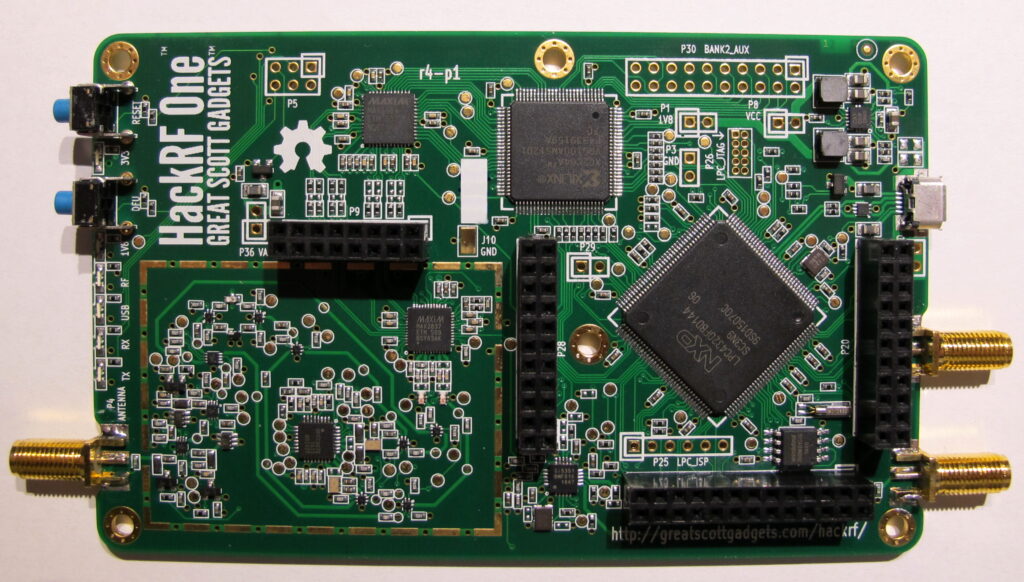
HackRF One is the current hardware platform for the HackRF project. It is a
Radio peripheral capable of transmission or reception of radio signals from 1MHz-6GHz. Designed to enable test and development of modern and next
generation radio technologies, HackRF One is an open source hardware platform that
can be used as a USB peripheral or programmed for stand-alone operation.
The PortaPack is add-on for the HackRF radio (HackRF + PortaPack +
Accessory Amazon bundle) which allows you to go portable with the HackRF and
a battery pack. It features a small touchscreen LCD and an iPod like control
wheel that is used to control custom HackRF firmware which includes an audio
receiver, several built in digital decoders and transmitters too. With the
PortaPack no PC is required to receive or transmit with the HackRF. The PortaPack is
a very handy partner to the HackRF. It allows you to experiment with, record, listen,
decode and transmit RF signals out in the field, without the need for any computer.
You do need to be responsible and careful with the device though, as there is the huge
potential of getting in trouble with it if you start transmitting illegal things
Main Features
The HackRF One R10 is the latest and most refined hardware revision of this popular software-defined radio. Built on the stable foundation of the R8 design, R10 reverts most of the changes made in R9, making it far more compatible with the widely used Mayhem PortaPack firmware. A key change in this revision is the return to the MAX2837 transceiver chip, which performs much better with the PortaPack compared to the MAX2839 used earlier. This results in smoother operation and improved stability for users running custom firmware.
When paired with the PortaPack H2 (R4)—the most stable version currently available—HackRF One R10 offers one of the most reliable and versatile setups for SDR enthusiasts. Beyond compatibility, R10 also introduces several important hardware improvements that enhance durability and protection. These include RF protection against excessive power at the antenna port to safeguard both the transmit amplifier and the receive LNA, CLK IN/OUT protection to prevent damage when using external clock sources, and MicroUSB protection to ensure long-term reliability during frequent connections.
Overall, HackRF One R10 represents a solid upgrade with stronger protection, improved compatibility, and better performance, making it the most reliable choice for researchers, security experts, and SDR hobbyists who want a future-proof device for advanced experiments.
HackRF One Specification
- half-duplex transceiver
- operating freq: 1MHZ -6GHz
- supported sample rates: 2 Msps to 20 Msps (quadrature)
- resolution: 8 bits
- interface: High Speed USB (with USB Micro-B connector)
- HackRF One User Manual
- powersupply: USB bus power
- software-controlled antenna port power (max 50 mA at 3.3 V)
- SMAfemaleantenna connector (50 ohms)
- SMAfemaleclock input and output for synchronization
- convenient buttons for programming
- pinheaders for expansion
- portable
- opensource
Interfaces
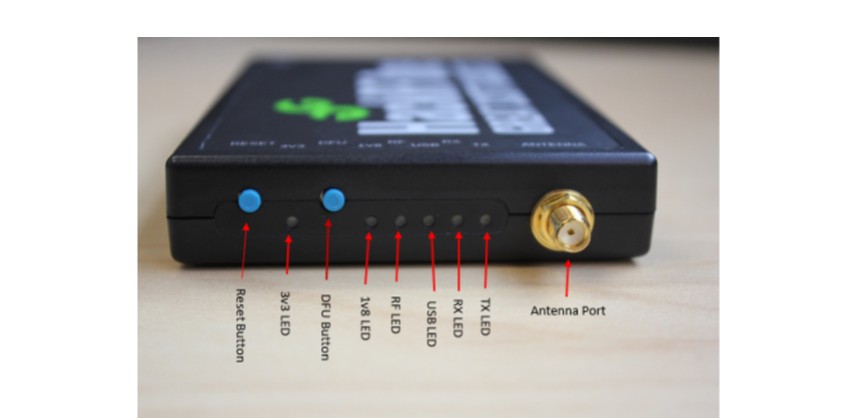
RESET – The reset button reboots the microcontroller and forces a USB re-enumeration. It is useful when the device becomes unresponsive and needs a quick restart without unplugging.//
DFU (Device Firmware Upgrade) – The DFU button invokes the bootloader stored in ROM, allowing recovery or unbricking if the firmware is corrupted. To enter DFU mode, hold the DFU button and reset or power on the device, then release it. Since the bootloader runs only during reset, the DFU button can also be used for other functions with custom firmware.
External Clock (CLKIN/CLKOUT) – HackRF One outputs a 10 MHz square wave (0–3 V) on CLKOUT and accepts a 10 MHz square wave input on CLKIN. This enables synchronization between multiple HackRF devices by connecting CLKOUT of one to CLKIN of another. The switch to an external clock occurs at the start of a transmit or receive operation. Verification can be done with the command:
hackrf_debug --si5351c -n 0 -r[ 0 ] -> 0x01= external clock detected[ 0 ] -> 0x51= no clock detected
LEDs
| Button / Light | Function |
|---|---|
| Reset Button | Reboots the HackRF One, equivalent to unplugging and reconnecting the device. |
| 3v3 LED | Indicates power. Lights up when HackRF One is plugged in. Used to distinguish power status. |
| 1V8 LED | Another power indicator LED used along with 3v3 and RF LEDs. |
| RF LED | Part of the power indication system, showing RF-related status when powered. |
| USB LED | Indicates that HackRF One is communicating over USB. |
| DFU Button | Used to install or update firmware, or recover the device if firmware is missing/corrupted. |
| RX LED | Orange light indicating the device is receiving data. |
| TX LED | Red light indicating the device is transmitting data. |
Transmit Power
The maximum TX power is between 0 and 10 dBm.
Overall, the output power is enough to perform over-the-air experiments at close
range or to drive an external amplifier. If you connect an external amplifier, you
should also use an external bandpass filter for your operating frequency.
Receive Power
The maximum RX power of HackRF One is -5 dBm. Exceeding -5 dBm can
result in permanent damage!
In theory, HackRF One can safely accept up to 10 dBm with the front-end RX
amplifier disabled. However, a simple software or user error could enable the
amplifier, resulting in permanent damage. It is better to use an external attenuator than
to risk damage
Portapack H2 Specification
The PortaPack is add-on for the HackRF radio (HackRF + PortaPack +
Accessory Amazon bundle) which allows you to go portable with the HackRF and
a battery pack. It features a small touchscreen LCD and an iPod like control
wheel that is used to control custom HackRF firmware which includes an audio
receiver, several built in digital decoders and transmitters too. With the
PortaPack no PC is required to receive or transmit with the HackRF.
The PortaPack is a very handy partner to the HackRF. It allows you to
experiment with, record, listen, decode and transmit RF signals out in the field,
without the need for any computer. You do need to be responsible and careful with the device though, as there is the huge potential of getting in trouble with it if you
start transmitting illegal things
| Items | Description |
|---|---|
| HackRF One Firmware | Flashed with the latest GitHub Mayhem 2.0.1 firmware, ready to use. We are a trusted device vendor recommended by the GitHub PortaPack-Mayhem Project. |
| Hardware Version | HackRF One: R10 | PortaPack H2: R4 |
| New CPLD Code of PortaPack H2 | From Jan 20th, 2024: Updated CPLD code so the reset button does not freeze the device. |
| PortaPack Screen | 3.2 inch Touch Screen |
| Speaker | Sound pressure level: 89 ± 3 dB |
| Lithium Battery | Built-in 2500 mAh Lithium Battery |
| Lithium Button Battery | Built-in CR1220 battery with RTC clock function (records current time when saving baseband file). |
| TCXO Clock | Built-in TCXO high-precision clock (0.5 ppm). Frequency stability is as accurate as walkie-talkies. Automatically switches to external TCXO if available. |
| TF Card Slot | Supports TF card for data storage, playback, and frequency management. |
| GitHub Links |
https://greatscottgadgets.com/hackrf/ https://github.com/portapack-mayhem/mayhem-firmware |
Stay tuned for more blogs, HackRF One and PortaPack H2 tutorials, guides, and hands-on experiments!